
Diagram Examples
This is a temporary example file to showcase/ test how document features are rendered.
Diagram Examples
This document demonstrates how to use PlantUML and Mermaid diagrams in your markdown content.
PlantUML Sequence Diagram
The following diagram shows the user interaction flow:
This diagram illustrates how a user navigates through the system, from the web browser to the Astro site, and how content is loaded and rendered.
Mermaid Flowchart
The build process workflow is shown in this flowchart:
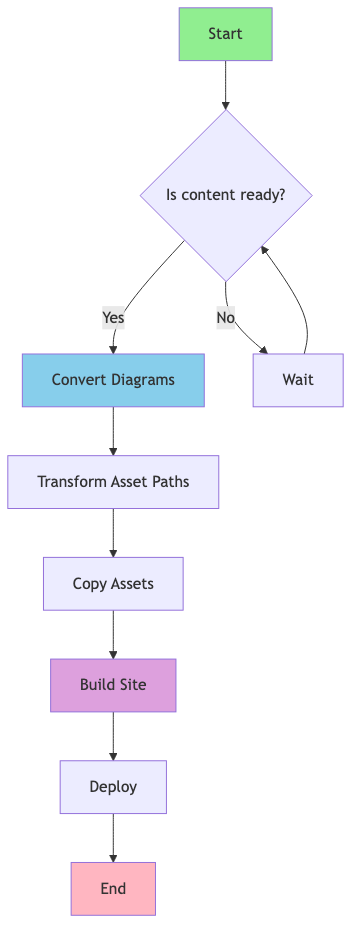
This flowchart demonstrates the complete build pipeline, from content preparation through deployment.
Using Diagrams in Your Content
You can reference diagram source files directly in your markdown:


During the build process:
- Diagram source files (
.puml,.mmd,.mermaid) are automatically converted to PNG images - Markdown references are updated to point to the generated
.pngfiles - Images are copied to the public folder for serving
Best Practices
- Keep diagram source files alongside your markdown content
- Use descriptive filenames for your diagrams
- Reference diagrams using relative paths
- Edit the source files (
.puml,.mmd) rather than the generated images
IP Disclosures
IP disclosures are not listed yet.
List of Contributors
Contributors are not listed yet.
Changelog
Changelog entries are not listed yet.