
Assignment and Grade Services
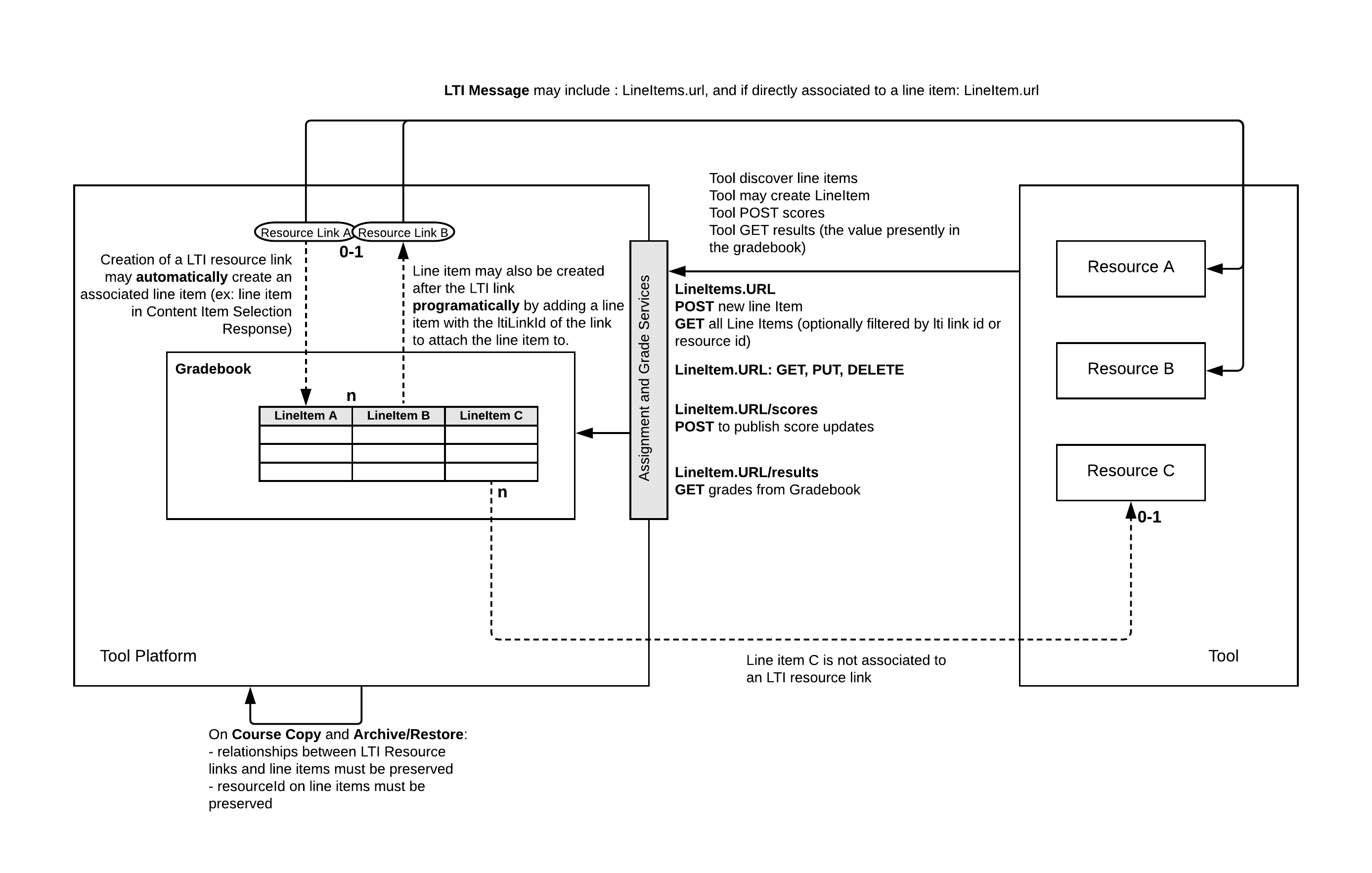
The Learning Tools Interoperability\u00ae (LTI) Assignment and Grade Services specification allows tools to manage gradebook columns and post scores.
Overview
Assignment and Grade Services are based on IMS Learning Information Services (LIS) IMS Global Learning Information Services v2.0. The Basic Outcomes service introduced in LTI 1.1 IMS Global Learning Tools Interoperability® Implementation Guide provides a simple facility for associating a single gradebook column with each resource link and allows a tool to manage results in these columns as decimal normalized values. The creation of the gradebook column is typically part of the LTI link configuration within the tool platform's interface.
This document builds upon the concepts and terms introduced in the LTI 1.3 specification IMS Global Learning Tools Interoperability® Core Specification v1.3, specifically:
- The notions of platforms and tools as participants in an LTI workflow
- The organization of collections of resources within contexts
- The interactions of messages and services
The Assignment and Grade Services, as described in this document, replace the Basic Outcomes service and significantly extends the ability of the tool to interact with the tool platform's gradebook by:
- Supporting the declarative model established by basic outcome (tool platform creating a gradebook column on link creation)
- Allowing direct access and management of the gradebook columns (allowing the tool to programmatically create gradebook columns)
- More expressiveness on the score information including maximum points and grading status
Notably, the Assignment and Grade Services removes the strict one-to-one relationship between a resource link and a line item:
- Resource link may have more than one related line items
- Line items may be created without any explicit relationship to any Resource Link
The specification supports the auto-create flow to support simpler cases where the creation of the line item is delegated to the platform upon resource link creation (either as a setting or a line item declaration in the content item definition), allowing a straight migration from the basic outcome service.
The Assignment and Grade Services are made of 3 services:
- LineItem service: Management of line items
- Score Service: Posting of scores by the tool. This service is a Write Only service (syncing grades to platform)
- Result Service: Getting current grades from the platform's gradebook This is a Read Only service.
Note that in any case the Assignment and Grade Services only expose gradebook information directly tied to the tool deployment. Other information in the tool platform's gradebook is not visible nor modifiable by the tool.
Terminology
- Line item
- A line item is usually a column in the tool platform's gradebook; it is able to hold the results associated with a specific activity for a set of users. The activity is expected to be associated with a single LTI context within the platform, so there is a one-to-many relationship between a context and its line items.
- Line item container
- A line item container has an array of line items. These line items might, for example, represent all those associated with a specific LTI context within the platform for the querying tool. Alternatively, the query may include a filter to query only line items associated to a resource link or a tool's resource. The actual content will depend upon the service request being used.
- Result
- A result is usually a cell in the tool platform's gradebook; it is unique for a specific line item and user. The value may have a numeric score and a comment. All results for a specific line item will be deemed to have a status of “Initialized” when the line item is created. A tool platform may maintain a history of changes for each result value and also allow an instructor to override a value. However, this service only provides access to the latest result. If the value of the result is changed directly within the tool platform, any such changes will be reflected in GET requests for the result.
- Score
- A score represents the last score obtained by the student for the tool's activity. It also exposes the current status of the activity (like completed or in progress), and status of the grade (for example, grade pending a manual input from the instructor). The score is sent from the tool to the tool platform using the score service. The tool platform ingests that value to possibly alter the current result (value shown in the gradebook).
- Score container
- The score container is the end point to push score updates for a given line item. It cannot be queried.
Conformance Statements
Document Set
Normative Documents
- LTI Advantage Conformance Certification Guide IMS Global Learning Tools Interoperability® Advantage Conformance Certification Guide
- The LTI Advantage Conformance Certification Guide describes the procedures for testing Platforms and Tools against the LTI v1.3 and LTI Advantage services using the IMS certification test suite.
Informative Documents
- LTI Advantage Implementation Guide IMS Global Learning Tools Interoperability® Advantage Implementation Guide
- The LTI Advantage Implementation Guide provides information to lead you to successful implementation and certification of the LTI Core v1.3 specification and the set of LTI Advantage specifications.
Relationship with other specifications
The Assignment and Grade Services relates to the following specifications:
- Deep Linking Message: The Deep Linking specification allows for a declarative option to create a line item by including its definition in the LTI Link's Content Item definition.
- Submission Review Message: The Submission Review Message specification allows the instructor and the student to launch from the gradebook back to the tool provider to see what's 'behind' a given result. This might for example allow the instructor to launch into a tool provider's grading interface in the context of a given student's submission.
Services definition
Assignment and Grade Service claim
This specification introduces the claim https://purl.imsglobal.org/spec/lti-ags/claim/endpoint.
This claim MUST be included in LTI messages if any of the Assignment and Grade Services
are accessible by the tool in the context of the LTI message.
The claim defines the following properties:
lineitems: the endpoint URL for accessing the line item container for the current context. May be omitted if the tool has no permissions to access this endpoint.lineitem: when an LTI message is launching a resource associated to one and only one lineitem, the claim must include the endpoint URL for accessing the associated line item; in all other cases, this property must be either blank or not included in the claim.scope: An array of scopes the tool may ask an access token for.
The platform MAY change end point URLs as it deems necessary; therefore, by
best practice, the tool should check with each message for the endpoint URL it
should use with respect to the resource associated with the message. By best
practice, the platform should maintain the presence of endpoints communicated
within a message for some length of time, as tools may intend to perform
asynchronous operations; for example, the tool may use the lineitem URL to
update scores quite some time after the student has actually completed its
associated activity.
Example Service Claims
Example: link with one line item, tool has all permissions
"https://purl.imsglobal.org/spec/lti-ags/claim/endpoint": {
  "scope": [
    "https://purl.imsglobal.org/spec/lti-ags/scope/lineitem",
    "https://purl.imsglobal.org/spec/lti-ags/scope/result.readonly",
    "https://purl.imsglobal.org/spec/lti-ags/scope/score"
  ],
  "lineitems": "https://www.myuniv.example.com/2344/lineitems/",
  "lineitem": "https://www.myuniv.example.com/2344/lineitems/1234/lineitem"
}
Example: link has no line item (or many), tool can query and add line items
"https://purl.imsglobal.org/spec/lti-ags/claim/endpoint": {
  "scope": [
    "https://purl.imsglobal.org/spec/lti-ags/scope/lineitem",
    "https://purl.imsglobal.org/spec/lti-ags/scope/result.readonly",
    "https://purl.imsglobal.org/spec/lti-ags/scope/score"
  ],
  "lineitems": "https://www.myuniv.edu/2344/lineitems/"
}
Example: link has a single line item, tool can only POST score
"https://purl.imsglobal.org/spec/lti-ags/claim/endpoint": {
  "scope": [
    "https://purl.imsglobal.org/spec/lti-ags/scope/score"
  ],
  "lineitem": "https://www.myuniv.edu/2344/lineitems/1234/lineitem"
}
Extensions
Line item, score and result MAY be enriched with additional data. Any extension MUST be done by adding a new parameter to the JSON object. The key name MUST be a fully qualified URL uniquely identifying the property. The value MUST be any valid JSON data. The organization MAY provide a JSON Schema defining the format of the data added.
For example, if a tool wanted to pass extra data to the platform when the score is updated, it MAY enrich the score as follows:
{
  "timestamp": "2017-04-16T18:54:36.736+00:00",
  "activityProgress" : "Completed",
  "gradingProgress" : "PendingManual",
  "userId" : "5323497",
  "https://www.toolexample.com/lti/score": {
    "originality": 94,
    "submissionUrl": "https://www.toolexample.com/lti/score/54/5893/essay.pdf"
  }
}
Line item service scope and allowed http methods
Access to this service MAY be controlled by authorization scopes. The authorization scope MAY differ per tool deployment and per context.
| Scope | Description | Allowed HTTP Methods |
|---|---|---|
| 'https://purl.imsglobal.org/spec/lti-ags/scope/lineitem' | Tool can fully managed its line items, including adding and removing line items | linetems URL: GET, POST - lineitem URL: GET, PUT, DELETE |
| 'https://purl.imsglobal.org/spec/lti-ags/scope/lineitem.readonly' | Tool can query the line items, no modification is allowed | lineitems URL: GET - lineitem URL: GET |
Line item service Media types and schemas
The accompanying OpenAPI documentation Learning Tools Interoperability® Assignment and Grade Services Version 2.0 OpenAPI Specs defines the following media types and schemas used by the line item Service:
- 'application/vnd.ims.lis.v2.lineitem+json'
- 'application/vnd.ims.lis.v2.lineitemcontainer+json'
The first media type provides a representation of a single line item; the second is a representation for a set of line items within a context.
Example Line Item Requests
Example GETting a single line item
HTTP/1.1 GET lineitem URL
Accept: application/vnd.ims.lis.v2.lineitem+json
200 OK
content-type: application/vnd.ims.lis.v2.lineitem+json
{
"id" : "https://lms.example.com/context/2923/lineitems/1",
"scoreMaximum" : 60,
"label" : "Chapter 5 Test",
"resourceId" : "a-9334df-33",
"tag" : "grade",
"resourceLinkId" : "1g3k4dlk49fk",
"startDateTime": "2018-03-06T20:05:02Z",
"endDateTime": "2018-04-06T22:05:03Z",
"gradesReleased": false,
"activityId": "c700d3b1-26fc-4878-b288-3404bf0db90e"
}
Example GETting all line items for a given container
HTTP/1.1 GET lineitems URL
Accept: application/vnd.ims.lis.v2.lineitemcontainer+json
200 OK
content-type: application/vnd.ims.lis.v2.lineitemcontainer+json
[  {
"id": "https://lms.example.com/context/2923/lineitems/1",
"scoreMaximum": 60,
"label": "Chapter 5 Test",
"resourceId": "a-9334df-33",
"tag": "grade",
"resourceLinkId": "1g3k4dlk49fk",
"endDateTime": "2018-04-06T22:05:03Z"
"gradesReleased": true,
"activityId": "c700d3b1-26fc-4878-b288-3404bf0db90e"
},
{
"id": "https://lms.example.com/context/2923/lineitems/47",
"scoreMaximum": 100,
"label": "Chapter 5 Progress",
"resourceId": "a-9334df-33",
"tag": "originality",
"resourceLinkId": "1g3k4dlk49fk"
},
{
"id": "https://lms.example.com/context/2923/lineitems/69",
"scoreMaximum": 60,
"label": "Chapter 2 Essay",
"tag": "grade"
}
]
Line Item id REST Endpoint
The id property of the line item is the service endpoint URL to access or modify that line item. It must be a fully qualified URL addressable for read (HTTP GET), update (HTTP PUT) and delete (HTTP DELETE) operations. While it may occasionally change, a learning platform should aim at keeping it stable.
The Line Item id URL also serves as a base URL for Score POST and Result GET operations.
Container Request Filters
A 'GET' request to the container endpoint MAY use one or more of the following query parameters to filter the response. If there are no matching line items, the returned value MUST just be an empty array:
HTTP/1.1 GET lineitems URL?resource_id=d0d6212ecc4e4696a76f7359ef76e3f4
Accept: application/vnd.ims.lis.v2.lineitemcontainer+json
200 OK
content-type: application/vnd.ims.lis.v2.lineitemcontainer+json
[]
Required filters. The platform MUST implement support for these filters:
-
resource_link_id- to limit the line items returned to only those which have been associated with the specified tool platform's LTI link ID (as passed in the 'resource_link_id' LTI message parameter). -
resource_id- to limit the line items returned to only those which have been associated with the specified tool resource identifier. -
tag- to limit the line items returned to only those which have been associated with the specified tag. -
limit- to restrict the number of line items returned; the platform MAY further reduce the number of items returned at its own discretion. If more items exist following the returned ones, a 'Link' http header (per Web Linking) with a URL pointing to the next page and a 'rel' value of 'next' MUST be included in the response; The platform MAY also include other relations including 'prev', 'first' and 'last'.The URL for the 'next' link is left to the discretion of the implementer. The tool must use the 'next' URL as is and not re-apply filters to it. The tool platform must thus make sure the 'next' URL contains enough information to insure the next page displays the right set of elements based on the filters present on the original request. For example:
Link: <https://lms.example.com/sections/2923/lineitems/69?p=2>; rel="next"
If both 'resource_link_id' and 'resource_id' are used in the same query, then only those LineItems which are associated with BOTH the link identified with the resource link ID and the tool's resource ID MUST be included in the result set.
Optional filters. The platform MAY implement support for these optional filters. If the platform does not support use of one of these filters as provided by the tool it should just ignore it, treating the request as the same as if the filter weren't provided at all:
activity_id- to limit the line items returned to only those which have been associated with the specified platform's activity.
Creating a new line item
A new line item is added by POSTing a line item
('application/vnd.ims.lis.v2.lineitem+json' representation) to the lineitems endpoint URL.
The response by the platform MUST be the newly created item, enriched by its URL.
POST lineitems URL
Authorization: Bearer 78aerc7829z.890.duepz
Content-Type: application/vnd.ims.lis.v2.lineitem+json
{
  "scoreMaximum" : 60,
  "label" : "Chapter 5 Test",
  "resourceId" : "quiz-231",
  "tag" : "grade",
  "startDateTime": "2018-03-06T20:05:02Z",
  "endDateTime": "2018-04-06T22:05:03Z"
}
HTTP/1.1 201 Created
{
"id" : "https://lms.example.com/context/2923/lineitems/1",
"scoreMaximum" : 60,
"label" : "Chapter 5 Test",
"resourceId" : "quiz-231",
"tag" : "grade",
"startDateTime": "2018-03-06T20:05:02Z",
"endDateTime": "2018-04-06T22:05:03Z"
}
Returned 'application/vnd.ims.lis.v2.lineitem+json' representation for platforms not supporting start and end times.
HTTP/1.1 201 Created
{
  "id" : "https://lms.example.com/context/2923/lineitems/1",
  "scoreMaximum" : 60,
  "label" : "Chapter 5 Test",
  "resourceId" : "quiz-231",
  "tag" : "grade"
}
The platform MUST NOT modify the resourceId and tag values. It
MAY modify the other properties, although preserving the original values
from the tool is recommended.
Note that the tool MAY provide a resourceLinkId value for the created line item; this
supports the case where the tool may want to create a line item for an LTI Link resource link
identifier that it has already received via a launch. The tool MAY NOT create a resource link
identifier value of its own accord, nor use a resource link identifier for an LTI Context other than
the one the platform already demonstrated owns that identifier. The platform may choose to ignore
this property if provided by the tool, or treat it as a bad request if the tool improperly uses the
resource link identifier value (for example, the link no longer exists in the LTI Context on the
platform).
The tool MAY provide an activityId value for the created line item; this supports
the case where the tool may want to create a line item for an activity identifier that it has already
received via a launch or notice. The tool MAY NOT create an activity identifier value of its own accord,
nor use an activity identifier for an LTI Context other than the one the platform already demonstrated
owns that identifier. The platform may choose to ignore this property if provided by the tool, or treat
it as a bad request if the tool improperly uses the activity identifier value (for example, the activity
no longer exists in the LTI Context on the platform).
Updating a line item
A tool may update a line item definition by PUTting a complete definition of the line item to the line item URL endpoint. Note that this operation replaces the line item definition with the new, complete definition provided by the tool; because of this, by best practice the tool should first GET the state of a line item to retrieve the platform's current complete definition -- this can help the tool avoid editing-conflict race conditions, unintentionally unsetting previously set line item properties, and so on.
A tool MUST NOT change the id and resourceLinkId values. The tool may
omit the id attribute. If the tool does provide a different value for one of these
attributes on update, the platform MAY either ignore those values or treat the update request as
invalid.
A platform may ignore changes to other attributes. The platform MUST return the line item definition as applied to the platform.
If the platform applies the scoreMaximum change, it is expected the results will be scaled to the updated value.
In the example below, the tool updates the line item's end time and label and voids the start time. The platform does not apply the change to scoreMaximum.
PUT lineitems URL
Authorization: Bearer 78aerc7829z.890.duepz
Content-Type: application/vnd.ims.lis.v2.lineitem+json
{
  "scoreMaximum" : 60,
  "label" : "Chapter 5 Test",
  "resourceId" : "quiz-231",
  "tag" : "grade",
  "endDateTime": "2018-04-06T22:05:03Z"
}
HTTP/1.1 201 Created
{
"id" : "https://lms.example.com/context/2923/lineitems/1",
"scoreMaximum" : 50,
"label" : "Chapter 5 Test",
"resourceId" : "quiz-231",
"tag" : "grade",
"startDateTime": "",
"endDateTime": "2018-04-06T22:05:03Z"
"gradesReleased": true
}
Label
The label is a short string with a human readable text for the line item. It MUST be specified and not blank when posted by the tool. A platform must always include the label.
scoreMaximum
The maximum score for this line item. Maximum score MUST be a numeric non-null value, strictly greater than 0.
resourceLinkId and binding a line item to a resource link
A line item MAY be attached to a resource link by including a 'resourceLinkId' in the payload. The resource link MUST exist in the context where the line item is created, and MUST be a link owned by the same tool. If not, the line item creation MUST fail with a response code of Not Found 404.
The platform MAY remove the line items attached to a resource link if the resource link itself is removed.
Tool resource identifier resourceId
A tool MAY identify which of its resources the line item is attached to by
including a non blank value for resourceId in the payload. This value
is a string. For example, resourceId can be 'quiz-231' or any
other resource identifier uniquely identifying a resource in a given context.
Multiple line items can share the same resourceId within a given context.
resourceId must be preserved when a context is copied if the line items
are included in the copy.
If no resourceId is defined for a lineitem, the platform may omit this attribute, or include it
with a blank or null value.
tag
A tool MAY further qualify a line item by setting a value to tag. The attribute is a
string. For example, one assignment resource may have 2 line items,
one with tag as 'grade' and the other tagged as 'originality'.
Multiple line items can share the same tag within a given context. tag must
be preserved when a context is copied if the line items
are included in the copy.
If no tag is defined for a lineitem, the platform may omit this attribute, or include it
with a blank or null value.
startDateTime
A tool MAY specify the initial start time submissions for this line item can be made by learners. The initial value may subsequently be changed within the platform.
ISO 8601 Date and time when the line item can start receiving submissions Representation of dates and times. ISO 8601:2004.. The datetime
value MUST include a time zone designator (Z designator or +00:00 offset
to specify UTC, or time offset from UTC for another time zone).
If the platform does not have any start time for the line item but supports that functionality, it SHOULD
include the parameter with a blank or null value.
If the platform does not support that functionality, it should omit this parameter.
endDateTime
A tool MAY specify the initial end time submissions for this line item can be made by learners. The initial value may subsequently be changed within the platform.
ISO 8601 Date and time when the line item stops receiving submissions Representation of dates and times. ISO 8601:2004.. The datetime
value MUST include a time zone designator (Z designator or +00:00 offset
to specify UTC, or time offset from UTC for another time zone).
If the platform does not have any end time but supports that functionality, it SHOULD
include the parameter with a blank or null value.
If the platform does not support that functionality, it should omit this parameter.
gradesReleased
A tool MAY specify to the platform if it wishes the grades to be released or not. A platform can decide how to handle this, as the platform owns its gradebook behavior.
activityId
A line item MAY be attached to an activity by including an 'activityId' in the payload. The activity MUST exist in the context where the line item is created. If not, the line item creation MUST fail with a response code of Not Found 404.
The platform MAY remove the line items attached to an activity if the activity itself is removed.
Course copy and export/import
When line items are copied (or exported and imported), all their attributes MUST be preserved, with the exception of the 'resource_link_id' which will now be the id of the link in the copied/imported course. If the line items to be copied/imported are attached to a link that will not be restored/copied, the tool platform MUST NOT copy/import those line items.
A tool MUST NOT create a new line item in a copied/restored course if that
line item would result in a duplicate. The tool MUST use the line items
URL to query the existing line items and use the resourceLinkId, resourceId
and/or tag values to internally apply the binding with the matching line item URLs.
Alternatively, for line item associated to resource links, it MAY just wait for the resource link to be launched and discover the associated line item using the line item parameter passed in the launch message.
Result Service
Result Service allows the tool to query the tool platform for the current results of its own line items. A result represents the current grade for a given line item and user in the platform's gradebook, including any change done directly to the grade within the tool platform. A result cannot be directly altered by the tool, and so only GET operations are supported. See Score Service for posting grades to the Tool Consumer.
Result service endpoint
The results service endpoint is a subpath of the line item resource URL: it MUST be the line item resource URL with the path appended with '/results'. Any query or route parameters from the line item resource URL must also be added.
Result service scope and allowed http methods
Access to this service MAY be controlled by authorization scope. The authorization scope MAY differ per tool deployment and per context.
| Scope | Description | Allowed HTTP Methods |
|---|---|---|
| 'https://purl.imsglobal.org/spec/lti-ags/scope/result.readonly' | Tool can access current results for its line items | line item URL/results: GET |
Result service Media type and schema
Since the service URL is derived from the line item resource URL, it is NOT included in LTI messages.
This service only supports GET operations and MUST return all the results for this line item (i.e. across all users enrolled in the line item's context). When a context member does not have a result for a line item, the platform MAY omit the result or return a result without any score.
The results can be narrowed to a single user result by filtering by 'user_id'.
Media type and schema
The accompanying OpenAPI documentation Learning Tools Interoperability® Assignment and Grade Services Version 2.0 OpenAPI Specs defines the following media type and schemas used by the Result service:
Example of GETting the results for a line item
GET lineitem URL/results
Authentication: Bearer 8789.ghiurn2.polgw1
Accept: application/vnd.ims.lis.v2.resultcontainer+json
HTTP/1.1 200 OK
content-type: application/vnd.ims.lis.v2.resultcontainer+json
[{
"id": "https://lms.example.com/context/2923/lineitems/1/results/5323497",
"scoreOf": "https://lms.example.com/context/2923/lineitems/1",
"userId": "5323497",
"resultScore": 0.83,
"resultMaximum": 1,
"scoringUserId": "4567890",
"comment": "This is exceptional work."
}]
id
URL uniquely identifying the result record.
scoreOf
URL identifying the Line Item to which this result belongs. Must be the same
as the line item id and the value of the lineitem claim when included in the LTI message.
userId
The userId contains the LTI user ID identifying the recipient of the Result (usually a learner).
The userId MUST be present.
resultScore
The current score for this user. The value must be a numeric value. If no value exists, this attribute may be omitted, or have
an explicit null value.
resultMaximum
The 'resultMaximum' value MUST be a positive number (with 0 considered a negative number); if no value is specified, then a default maximum value of 1 must be used.
scoringUserId
The scoringUserId contains the LTI user ID identifying the provider of the Result
(usually an instructor). If no value exists, this attribute may be omitted (if the Platform does
not support this property, or if the item's result was provided by machine-scoring, for example).
comment
The current value for the comment. The value must be a string. If no value exists, this attribute may be omitted, blank or have
an explicit null value.
Platform MAY skip empty results
A GET on Results URL MUST return a result record for each user that has a non empty 'resultScore' for the queried upon line item. The platform MAY skip empty results.
Container Request Filters
A 'GET' request to the container endpoint MAY use the following query parameters to filter the response:
user_id: to filter the results to a single user. The results MUST contain at most 1 result. An empty array MAY be returned if the user does not have any result recorded.limit: to restrict the number of results returned; the platform MAY further reduce the number of results returned at its own discretion.
If more result records exist following the returned ones, a 'Link' http header (per Web Linking) with a URL pointing to the next page and a 'rel' value of 'next' MUST be included in the response. The platform MAY also include other relations including 'prev', 'first' and 'last'.
Score publish service
A score represents the grade and, more generally, the status of a user in regards to a given line item within the tool. The score service is used by the tool to publish the latest tool scores to the platform. The score service is write only, GET operations are explicitly not supported.
Service endpoint
The scores service endpoint MUST be the line item resource URL with the path appended with '/scores'. Any query or route parameters from the line item URL must also be added.
Since the service URL is derived from the line item resource URL, it is NOT included in LTI messages.
Score service scope and allowed http methods
Access to this service MAY be controlled by authorization scope. The authorization scope MAY differ per tool deployment and per context.
| Scope | Description | Allowed HTTP Methods |
|---|---|---|
| 'https://purl.imsglobal.org/spec/lti-ags/scope/score' | Tool can publish score updates to its line items | {LineItem.url}/scores: POST |
Score service Media type and schema
The accompanying OpenAPI documentation Learning Tools Interoperability® Assignment and Grade Services Version 2.0 OpenAPI Specs defines the following media types and schemas used by the Score service:
- 'application/vnd.ims.lis.v1.score+json'
Example POSTing a final score update
POST lineitem URL/scores
Content-Type: application/vnd.ims.lis.v1.score+json
Authentication: Bearer 89042.hfkh84390xaw3m
{
  "timestamp": "2017-04-16T18:54:36.736+00:00",
  "scoreGiven" : 83,
  "scoreMaximum" : 100,
  "comment" : "This is exceptional work.",
  "activityProgress" : "Completed",
  "gradingProgress": "FullyGraded",
  "userId" : "5323497",
  "scoringUserId": "4567890"
}
HTTP/1.1 204 No Content
Example POSTing a progress started score update
POST lineitem URL/scores
Content-Type: application/vnd.ims.lis.v1.score+json
Authentication: Bearer 89042.hfkh84390xaw3m
{
  "timestamp": "2017-03-16T18:54:36.736+00:00",
  "activityProgress" : "InProgress",
  "gradingProgress": "NotReady",
  "userId" : "5323497",
  "submission": {
    "startedAt": "2017-03-13T16:12:27.000+00:00",
    "submittedAt": "2017-03-14T18:42:15.000+00:00"
  }
}
HTTP/1.1 204 No Content
scoreGiven and scoreMaximum
All scoreGiven values MUST be positive number (including 0). scoreMaximum
represents the denominator and MUST be present when scoreGiven is present.
When scoreGiven is not present or null, this indicates there is presently
no score for that user, and the platform should clear any previous score
value it may have previously received from the tool and stored for that user and line item.
The platform MUST support scoreGiven higher than scoreMaximum.
For example, if the tool passes normalized score, ranging from 0 to 1,
the scoreMaximum would be 1. scoreGiven: 1.1 would be a valid score.
A scoreGiven MAY be used to pass actual points value, in which case a value
for scoreMaximum would be the maximum points possible for that student.
For example, the tool MAY pass scoreGiven: 1, scoreMaximum: 3
instead of scoreGiven: 0.33333, scoreMaximum: 1.
Usually a platform will just re-scale the value to the line item's scoreMaximum.
For example, if the line item maximum is 6 in the above example,
then it would show 2 points as the given score; accordingly, the result
would contain resultScore of 2 and resultMaximum of 6.
userId
The userId contains the LTI user ID identifying the recipient of the Score (usually a learner).
The userId MUST be present.
scoringUserId
The scoringUserId contains the LTI user ID identifying the provider of the Score
(usually an instructor). If present, this property must contain an LTI user ID (it may not be null
or empty); this property is optional and need not be provided (if, for example, the Tool doesn't
support the property or the Score is determined by machine-scoring).
activityProgress
activityProgress MUST be used to indicate to the tool platform the
status of the user towards the activity's completion.
The activityProgress property of a score MUST have one of the following values:
Initialized– the user has not started the activity, or the activity has been reset for that student.Started– the activity associated with the line item has been started by the user to which the result relates.InProgress- the activity is being drafted and is available for comment.Submitted- the activity has been submitted at least once by the user but the user is still able make further submissions.Completed– the user has completed the activity associated with the line item.
It is up to the tool to determine the appropriate 'activityProgress' value. A tool platform MAY ignore statuses it does not support.
The activityProgress property SHOULD be updated and transmitted to the platform anytime any meaningful state change in the activity takes place.
For example, if a student begins an activity the activityProgress should be updated to 'Started' and sent to the platform.
gradingProgress
gradingProgress MUST be used to indicate to the platform the status of the
grading process, including allowing to inform when human intervention is needed.
The gradingProgress property of a score must have one of the following values:
FullyGraded: The grading process is completed; the score value, if any, represents the current Final Grade; the gradebook may display the grade to the learnerPending: Final Grade is pending, but does not require manual intervention; if a Score value is present, it indicates the current value is partial and may be updated.PendingManual: Final Grade is pending, and it does require human intervention; if a Score value is present, it indicates the current value is partial and may be updated during the manual grading.Failed: The grading could not complete.NotReady: There is no grading process occurring; for example, the student has not yet made any submission.
It is up to the tool to determine the appropriate gradingProgress value.
A tool platform MAY ignore scores that are not FullyGraded as those have
to be considered partial grades.
The gradingProgress property SHOULD be updated and transmitted to the platform anytime any meaningful state change in the activity takes place.
Example 'application/vnd.ims.lis.v1.score+json' of a Score Pending Manual grading representation
{
  "timestamp": "2017-04-16T18:54:36.736+00:00",
  "activityProgress" : "Completed",
  "gradingProgress" : "PendingManual",
  "userId" : "5323497"
}
timestamp
The timestamp MUST be present and indicate when the score was changed; it is
intended to be used by the platform as a way to guard against out of order score
updates. Score timestamp represents the server time when the Score state was
modified. It MUST always be strictly increasing, so, for example, if a score
has a value 'V1' at timestamp 'T1', then the score is updated at 'T2' to be 'V2',
then reverted to 'V1', then the revert MUST have a timestamp 'T3' such that
'T1 < T2 < T3' and the three updates MUST have been sent to the platform
in the following order:
- (V1, T1)
- (V2, T2)
- (V1, T3)
Timestamp values MUST be formatted using ISO 8601 with a sub-second precision. The value MUST
include a time zone designator (Z designator or +00:00 offset to specify
UTC, or time offset from UTC for another time zone).
A tool MUST NOT send multiple score updates of the same (line item, user) with the same timestamp.
The platform MUST NOT update a result if the last timestamp on record is later than the incoming score update. It may just ignore the incoming score update, or log it if it maintains any kind of history or for traceability.
Example of valid timestamps
  "timestamp": "2017-04-16T18:54:36.736+00:00"
  "timestamp": "2017-04-16T18:54:36.736Z"
  "timestamp": "2017-04-16T18:54:36.736+00"
submission (Optional)
The submission MAY be present and contains metadata about the submission attempt.
startedAt (Optional)
The startedAt MAY be present and indicates when work on the line item submission was
first started by the student. If present, the value MUST be formatted using ISO 8601 with a
sub-second precision. The value MUST include a time zone designator (Z designator or
+00:00 offset to specify UTC, or time offset from UTC for another time zone).
The tool should include the startedAt in subsequent score updates. However, if not
present, the platform should use the last value it received unless the activityProgress
is set back to Initialized, in which case the startedAt value should be
cleared.
In the abscence of startedAt, the learning platform should continue to use the
timestamp of the 1st score event it receives with an activityProgress of
Started or InProgress as the startedAt value.
submittedAt (Optional)
The submittedAt MAY be present and indicates when work on the line item submission was
completed by the student. If present, the value MUST be formatted using ISO 8601 with a sub-second
precision. The value MUST include a time zone designator (Z designator or
+00:00 offset to specify UTC, or time offset from UTC for another time zone).
If this field, and the startedAt field are both present, then this field must be equal to, or later
in time than, the startedAt field. The tool should include the submittedAt in
subsequent score updates. However, if not present, the platform should use the last value it
received unless the activityProgress is set back to Initialized,
Started or InProgress, in which case the submittedAt value
should be cleared.
In the abscence of submittedAt, the learning platform should continue to use the
timestamp of the 1st score event it receives with an activityProgress of
Submitted or Completed as the submittedAt value.
comment
A score object MAY include a comment. A comment value MUST be a string in plain text format.
comment is intended to be seen by both the student and the instructors.
This specification does not support an history of comments; the platform MUST
update its comment with every score update. If a score update does not contain
a comment, a blank or null, then the comment value MUST be cleared in the platform if the previously recorded comment was also a comment sent from the tool.
Implementation guidelines
Difference between result and score services
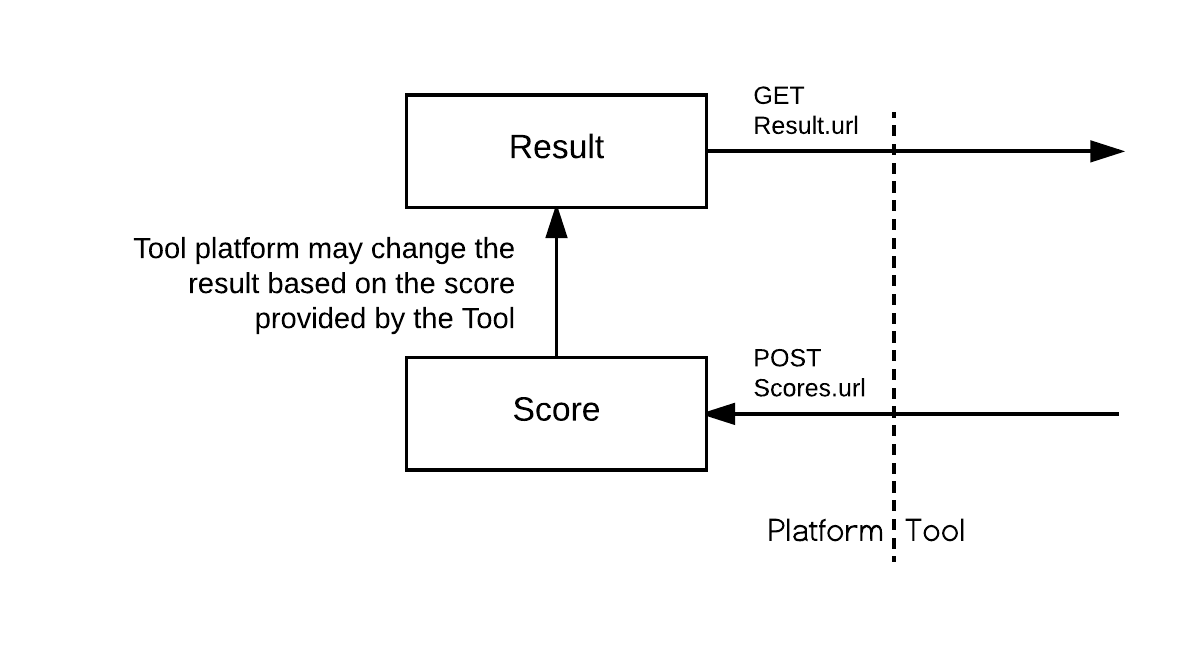
The Result is the current score within the Tool Consumer for the line item and user i.e. the value currently showing in the cell for that column and user in a typical tabular gradebook. This value can only be read by the tool, as the platform has the final say on what should be a student final score; for example, an instructor may force a grade through a manual entry directly in the gradebook. Or a modifier may be applied (late work, ...).
The Score is the last score (or status change) the user got within the tool itself. It is published to the platform so that it may be used to update the current result. This value is write-only.
Datetime values
It's highly recommend that all datetime values sent by both platform and tool be UTC (using either
the Z designator or the +00:00 UTC time offset value).
Coupled vs decoupled line items
With the Assignment and Grade Services, there are now 2 main models of interaction to create and manage line items:
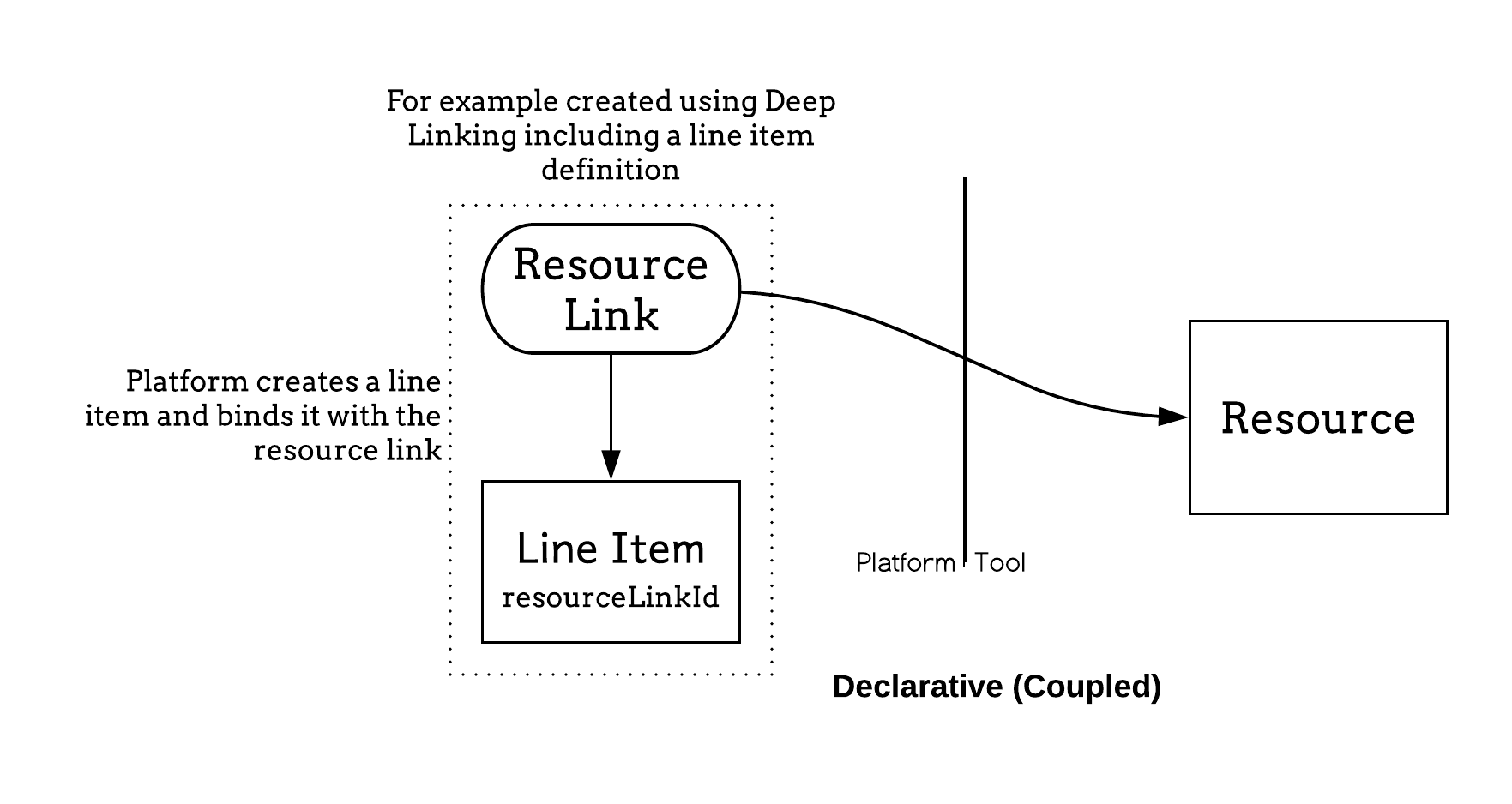
Declarative:
The platform creates the line item, usually at the time of the resource link creation. The resource link and line item are coupled. On resource link launch, substitution parameters related to the line item must be passed to the tool. The platform owns the lifecycle of the line item. This is the historical flow for line items lifecycle in LTI.
Programmatic:
The tool uses the line item service to manage its own line items. Those line items are typically not attached to any resource link i.e. it no longer requires a resource link to return grades. This is the decoupled model introduced by this specifications.
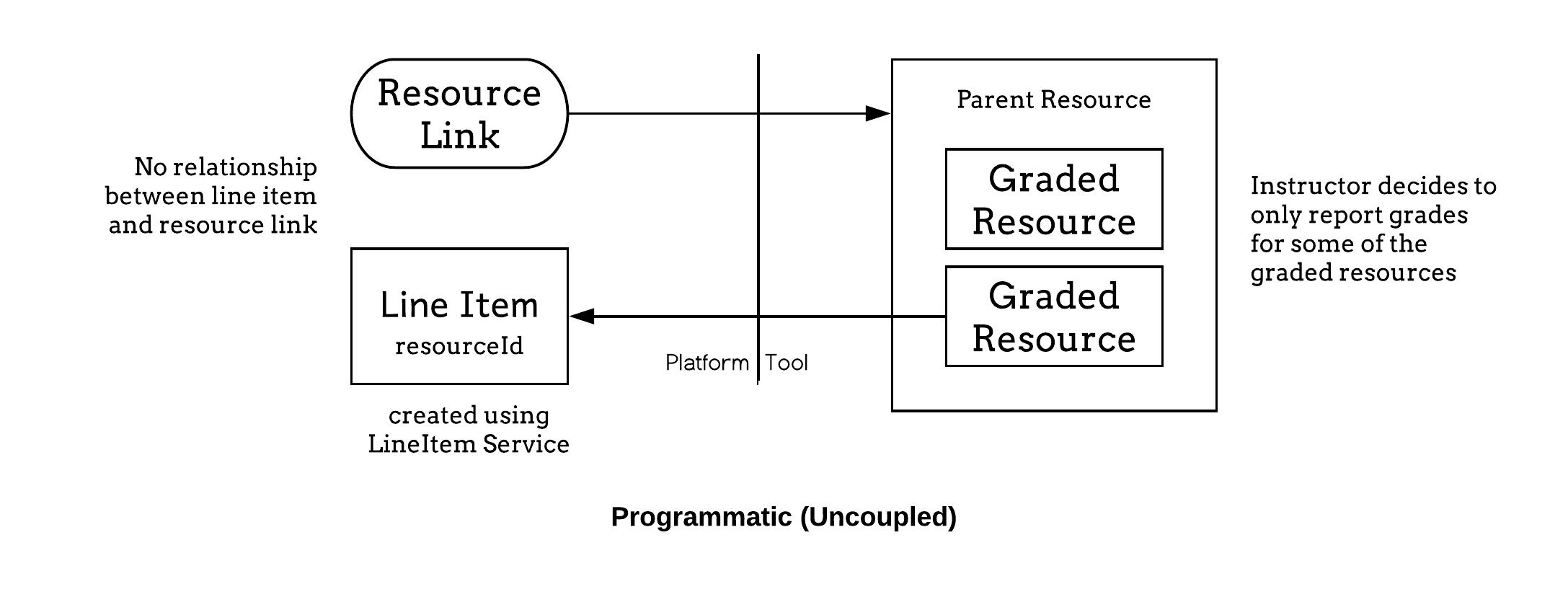
The decoupled approach offers much greater flexibility to the tool; for example it may push grades obtained through a different channel like a mobile app, or handle more complex tool offering complex experiences made of many activities behind a single link. It however requires an elevated level of trust from the platform which might be cautious to which tools it grants POST on 'LineItems.url'. The tool should prefer the simpler declarative model if it fits its requirement.
Substitution parameters available on launch
'LineItem.url' can only be resolved if there is only a single associated line item with the resource link. In that case, the corresponding matching parameters MUST be present in the launch data. This is a convenience that simplifies the most common use case and offers a natural migration from Basic Outcome Service. If, however, there is more than one line item, or no direct relationship between the resource link and line items, the platform cannot pass any of those values. The tool will need to use the 'LineItems.url' and filter by either 'resource_link_id', 'resource_id' and/or 'tag' depending on the binding model chosen. The tool should then persist that information to avoid querying the 'lineItems.url' each time a grade operation is needed.
Migrating from basic outcomes service
Tools already using the Basic Outcomes service introduced in LTI 1.1 can migrate their implementations to by using the score and result services and, if appropriate, also take advantage of the line item service to add further line items.
Migration from basic outcome service can be achieved in the following way:
| Basic outcome | Assignment and Grade Service |
|---|---|
| lis_outcome_service_url, lis_result_sourcedid | LineItem.url, user_id |
| ReplaceResult | POST score with scoreGiven=normalizedScore, scoreMaximum=1 and gradingProgress: FullyGraded to {LineItem.url}/scores |
| DeleteResult | POST score with no score, gradingProgress: NotReady, activityProgress: Initialized to {LineItem.url}/scores |
| ReadResult | GET from {LineItem.url}/results?user_id={user_id}, returns an array of at most 1 result |
The associated line item is the same as the one which would be accessed using the Basic Outcomes service if the platform offered both services, in which case the services could be used interchangeably.
Submission Review Message
The Submission Review Message is a companion specification which allows launches from a result in the platform's gradebook (or wherever the result is displayed) back to the Tool in the context of the result; for example, a student can see an 82% and click on the grade to actually see the submission, or an instructor can directly access the student's submission to review and grade it.
The ability for the Tool to exchange statuses in addition to score values offers the infrastructure for a richer integration; for example:
- The tool posts a Score with a
gradingProgress: pendingManual - The platform decorates the gradebook cell with a needs attention indicator
- The instructor can then click on the indicator
- An
LtiSubmissionReviewRequestlaunches the user into the grading interface of the tool, directly in context of the activity and student to be graded - After grading, the tool sends a score update through a POST to the Score endpoint and redirects the user back the Learning Platform using the return URL included in the launch
- The tool platform updates the grade and status of the activity for that student
Scores and gradingProgress
The Tool must set the 'gradingProgress' to 'FullyGraded' when communicating the actual student's final score. The platform may decide to not record any score that is not final ('FullyGraded').
Managing Multiple Line Items
These new services enable a tool to return multiple results to a tool consumer for a single resource. For example, a percentage progress measure could be maintained as well as the grade achieved in the tool consumer gradebook. The typical workflow for achieving this is as follows (assuming that the LineItem, Score and Result services are enabled for the tool by the tool consumer, and the 'LineItems.url' capability has been agreed between the parties):
- On receipt of the first launch from a resource link, the tool sends a 'GET' request to the 'LineItems.url'. It may specify the 'resource_link_id' query parameter to only get the line items associated with the link. The response is checked for any existing line items and, for those which are not present (based on the value of their 'tag' or 'resourceId' element), the tool sends a POST request to the line item container endpoint with the 'resourceLinkId' element set to the value of the 'resource_link_id' message parameter and an appropriate value for the 'tag' element; for example, "grade" or "progress". The 'id' elements is extracted from the response(s) received and saved for future reference. It will serve as the base to get results and post scores.
- As a learner progresses through the resource, scores may be 'POST'ed to the 'scores' endpoint.
- When the learner completes the activity, score may be 'POST'ed to the 'scores' endpoint with an 'activityProgress' of 'Completed'.
- When the final score is set on the activity, score must 'POST'ed to the 'scores' endpoint with a 'gradingProgress' of 'FullyGraded'.
Note that for simpler interaction, there may only need to be a single POST to scores, when the activity is completed and graded.
Further, line items can be created in the same way; giving each a unique 'tag' or 'resourceId' value allows their purpose to be identified when requesting a line item container and, for example, when a resource link has been copied within the tool consumer (thereby giving it a new resource link ID).
The flow is similar when a binding to a resource ID rather than to a resource link ID is used.
Line Item Declaration through Deep Linking
Alternatively to being created programmatically using the LineItems Service, line items may also be created declaratively by embedding their definitions within the LTI link definition as part of a Deep Linking message exchange (see https://www.imsglobal.org/spec/lti-dl/v2p0).
IP Disclosures
IP disclosures are not listed yet.
List of Contributors
The following individuals contributed to the development of this document:
| Name | Affiliation | Role |
|---|---|---|
| Paul Gray | Learning Objects | |
| Viktor Haag | D2L | |
| Dereck Haskins | IMS Global | |
| Martin Lenord | Turnitin | |
| Karl Lloyd | Instructure | |
| Mark McKell | IMS Global | Editor |
| Nathan Mills | Instructure | |
| Bracken Mosbacker | Lumen Learning | |
| Padraig O'hiceadha | HMH | |
| Marc Phillips | Instructure | |
| Eric Preston | Blackboard | Editor |
| James Rissler | IMS Global | Editor |
| James Tse | ||
| Charles Severance | University of Michigan | |
| Lior Shorshi | McGraw-Hill Education | |
| Colin Smythe | IMS Global | |
| Claude Vervoort | Cengage | Editor |
Changelog
The following changes were made in this version of the document:
| Doc Version | Date | Change | Type |
|---|---|---|---|
| 1.0 | 2015-01-05 | The first version of the Outcomes Management specification, including the Basic Outcomes service model. | Released |
| 2.0 | 2019-04-16 | Replaces the Outcomes Management and Basic Outcomes specifications. | Changed |
| 2.0 | 2020-06-24 | Errata: corrects the reference to the Submission Review Message document in section 1.5. | Fixed |
| 2.0 | 2020-10-20 | Errata: removes references to LTI 2.0 and 1.1; simplification and clarification on usage of optional; additional examples; formatting. | Fixed |
| 2.0 | 2021-07-01 | Errata: clarifies wording around FullyGraded. | Fixed |
| 2.0.2 | 2023-01-24 | Clarification: Line Item service PUT; platform MUST respond with JSON. Add gradesReleased to LineItem. Clarification: The userId is the LTI User ID for the score recipient. Add startedAt and submittedAt to Score#submission. Clarification: activityProgress and gradingProgress. Update some descriptions to new Submission Review name. Minor grammar corrections. | Changed |
| 2.0.3 | 2024-01-23 | Clarification: Line Item Id is the service endpoint URL for the line item. Updated to newer 1EdTech Respec template. | Changed |
IPR and Distribution Notices
Recipients of this document are requested to submit, with their comments, notification of any relevant patent claims or other intellectual property rights of which they may be aware that might be infringed by any implementation of the specification set forth in this document, and to provide supporting documentation.
1EdTech takes no position regarding the validity or scope of any intellectual property or other rights that might be claimed to pertain to the implementation or use of the technology described in this document or the extent to which any license under such rights might or might not be available; neither does it represent that it has made any effort to identify any such rights. Information on 1EdTech's procedures with respect to rights in 1EdTech specifications can be found at the 1EdTech Intellectual Property Rights web page: https://www.1edtech.org/ip.
Copyright © 1EdTech Consortium, Inc. All Rights Reserved.
Use of this specification to develop products or services is governed by the license with 1EdTech found on the 1EdTech website: https://www.1edtech.org/standards/specification-license.
Permission is granted to all parties to use excerpts from this document as needed in producing requests for proposals.
The limited permissions granted above are perpetual and will not be revoked by 1EdTech or its successors or assigns.
THIS SPECIFICATION IS BEING OFFERED WITHOUT ANY WARRANTY WHATSOEVER, AND IN PARTICULAR, ANY WARRANTY OF NONINFRINGEMENT IS EXPRESSLY DISCLAIMED. ANY USE OF THIS SPECIFICATION SHALL BE MADE ENTIRELY AT THE IMPLEMENTER'S OWN RISK, AND NEITHER THE CONSORTIUM, NOR ANY OF ITS MEMBERS OR SUBMITTERS, SHALL HAVE ANY LIABILITY WHATSOEVER TO ANY IMPLEMENTER OR THIRD PARTY FOR ANY DAMAGES OF ANY NATURE WHATSOEVER, DIRECTLY OR INDIRECTLY, ARISING FROM THE USE OF THIS SPECIFICATION.
Trademark information: https://www.1edtech.org/about/legal/trademarks