
Markdown Examples
This is a temporary example file to showcase/ test how document features are rendered.
You're viewing the latest Final version
This is version 1.0.0 of this specification, which is the latest Final version. A newer version v1.0.1 is currently in development (Draft).
Overview
This page is a comprehensive Markdown feature playground to validate rendering across common and extended features.
Use the quick links below to jump to sections:
- Headings
- Emphasis
- Blockquotes
- Lists
- Task Lists
- Code
- Tables
- Links
- Embedded Segments
- Images
- Horizontal Rules
- Footnotes
- HTML Blocks
- GitHub Flavored Markdown
Headings
H1 Heading
H2 Heading
H3 Heading
H4 Heading
H5 Heading
H6 Heading
Paragraph under headings. Lorem ipsum dolor sit amet, consectetur adipiscing elit.
Definitions
- First Term
- This is the definition of the first term.
- Second Term
- This is one definition of the second term.
- This is another definition of the second term.
- LTI
- Learning Tools Interoperability (LTI) is a 1EdTech standard for integration of rich learning applications within educational environments.
- Platform (LTI Tool Platform)
- Traditionally, a Learning Management System (LMS), but may be any kind of platform that needs to delegate bits of functionality to a suite of LTI tools.
- Message, Launch
- The process by wich a user in the platform interacts with an LTI placement
(link) to initiate a user-experience transfer of the browser over to the tool
via an HTML form post redirection containing the message data payload. The
message payload's
message-typeproperty determines the contents contained in the message (as discussed in the "Message type and schemas" section following).
(schema-resourcelinkrequest)=
LtiResourceLinkRequest.json
: Schema for LtiResourceLinkRequest messages: https://purl.imsglobal.org/spec/lti/v1p3/schema/json/LtiResourceLinkRequest.json.
Emphasis
Regular text, with variants: italic, italic, bold, bold, bold italic, strikethrough, and inline code.
Superscript and subscript via HTML: H2O, E = mc2.
Escaped characters: *not italic*, _not italic_, # not a heading, `not code`.
Blockquotes
This is a blockquote.
It can span multiple paragraphs.
- And include lists
- Inside the quote
Nested blockquote:
Deeper level quote.
Lists
Unordered list variants:
- Dash item level 1
- Nested dash level 2
- Nested dash level 3
- Nested dash level 2
- Asterisk item
- Nested asterisk
- Plus item
- Nested plus
Ordered list with different markers and nesting:
- First
- Second
- Second.a
- Second.b
- Third
Ordered list continued after an interruption:
- Alpha
- Beta (auto-numbered)
- Gamma
Definition-style (via HTML to ensure support):
- Term
- Definition that can include formatting.
- Another Term
- Another definition.
Task Lists
- Completed task
- Incomplete task
- Nested completed
- Nested incomplete
Code
Inline: Use npm run dev to start the server.
Fenced code blocks (no language):
SELECT *
FROM users
WHERE active = true;
JavaScript code block:
export function add(a, b) {
  if (typeof a !== 'number' || typeof b !== 'number') {
    throw new TypeError('Arguments must be numbers');
  }
  return a + b;
}

console.log(add(2, 3));
Bash code block:
#!/usr/bin/env bash
set -euo pipefail

echo "Building..."
npm ci
npm run build
JSON code block:
{
  "name": "example-site",
  "private": true,
  "scripts": {
    "dev": "astro dev",
    "build": "astro build"
  }
}
Code block with backticks inside (using tildes):
Here is a code block that contains triple backticks:

```
function example() {
  return `Template literal with code fence backticks`;
}
```
Tables
Basic table with alignment:
| Left Align | Center Align | Right Align |
|---|---|---|
| L1 | C1 | R1 |
| L2 | C2 | R2 |
| L3 | C3 | R3 |
Table with inline formatting:
| Feature | Status | Notes |
|---|---|---|
| Emphasis | OK | Supports italic and bold |
| Code | OK |
Inline and fenced |
| Task List | OK | - [x] Works |
Links
Inline link: Astro Docs
Reference link: MD Spec
Autolink: https://example.com
Anchor link: Jump to Overview
Embedded Segments
This specification includes additional chapters that are embedded from separate documents:
Appoach 1
uses @chapter1.md
Chapter in another file
This is a chapter in another file.
Approach 2
Chapter in another file
This is a chapter in another file.
Images
Local image with alt text and title:
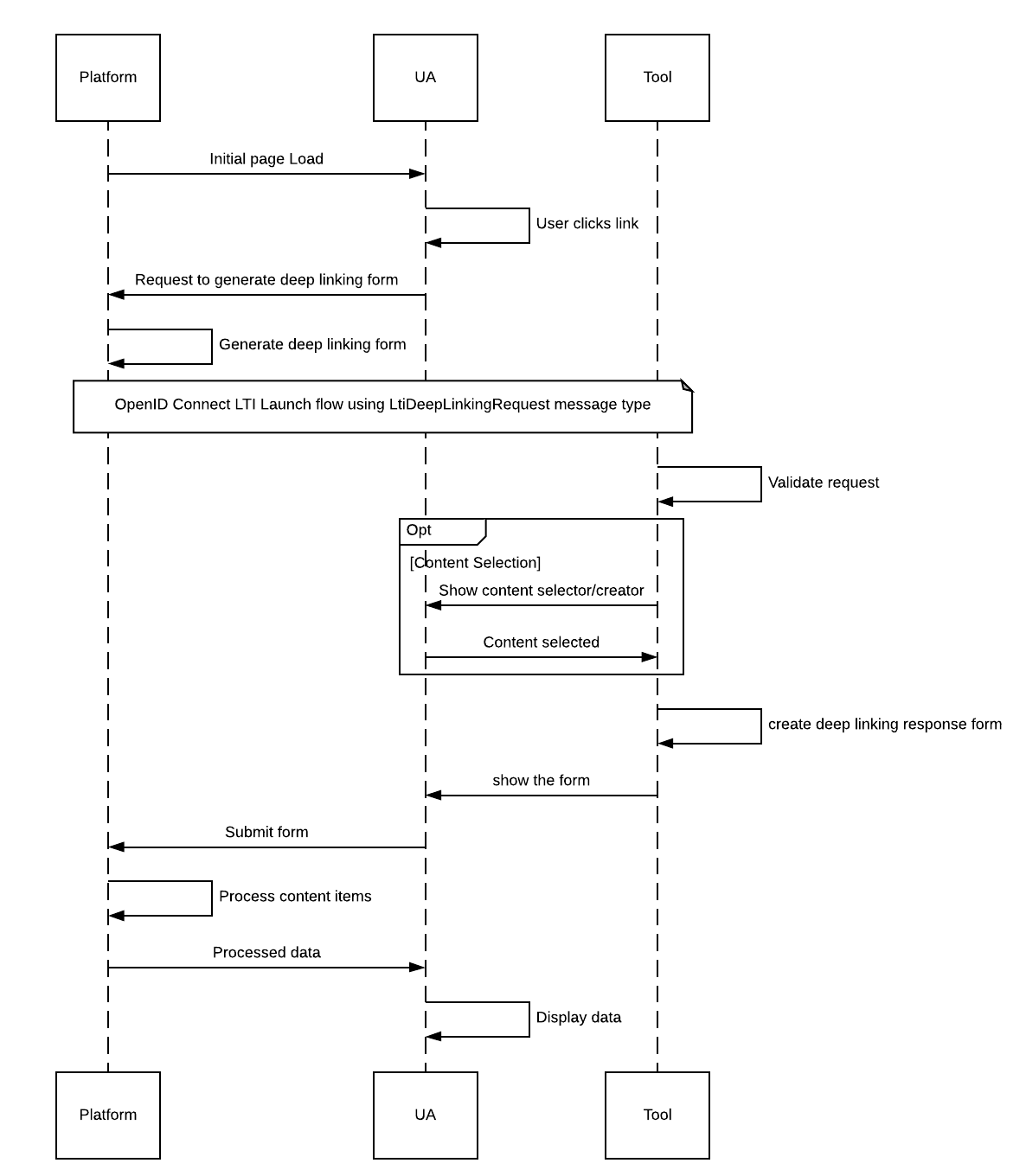
Remote image (may be blocked offline):

Horizontal Rules
Three styles should all render as horizontal rules:
Footnotes
Here is a statement with a footnote.1 Another one with a second footnote.2
HTML Blocks
Expandable details
This content is hidden by default and shown when expanded.
- Supports lists
inline codeinside HTML
Custom callout using a blockquote:
❗️ Important: This is an important callout rendered as a quote.
Mixed Content Example
Heading with list and code
- Item A
- Item B
type User = { id: string; name: string };
Concluding paragraph to ensure trailing spacing and rendering behave correctly.
GitHub Flavored Markdown
This section demonstrates features enabled by the remark-gfm plugin.
Strikethrough
Use double tildes for strikethrough text: This text is deleted.
But this text is normal.
Task Lists
Task lists with both complete and incomplete items:
- Completed task with GFM
- Incomplete task with GFM
- Another completed task
- Another incomplete task
Tables
GitHub-style tables with various content:
| Feature | Status | Notes |
|---|---|---|
| Strikethrough | Using inline formatting | |
| Code | inline code |
With mixed content |
| Links | Example | With URLs |
| Emoji | ✅ 🎉 💡 | Unicode support |
Complex table with merged styling:
| Item | Quantity | Price |
|---|---|---|
| Widget A | 100 | $50.00 |
| Widget B | 200 | $75.00 |
| Total | 300 | $125.00 |
Autolink Literals
These URLs automatically become links:
- https://astro.build
- http://example.com
- ftp://ftp.example.com
- user@example.com (email addresses)
Frontmatter
This document uses frontmatter (at the top) with metadata like title, version, and status. The remark-gfm plugin helps process this metadata correctly.
Footnotes
IP Disclosures
The following participating organizations have made explicit license commitments to this specification:
| Organization Name | Date election made | Necessary claims | Type |
|---|---|---|---|
| 1EdTech Consortium | 2025-01-15 | No | RAND (Royalty-Free) |
| Acme University | 2025-02-01 | Yes | RAND (Reasonable and Non-Discriminatory) |
| Tech Solutions Inc | 2025-01-20 | No | RAND (Royalty-Free) |
List of Contributors
The following individuals contributed to the development of this document:
| Name | Affiliation | Role |
|---|---|---|
| John Smith | 1EdTech Consortium | Lead Developer |
| Jane Doe | Acme University | Technical Writer |
| Bob Johnson | Tech Solutions Inc | Architect |
Changelog
The following changes were made in this version of the document:
| Doc Version | Date | Change | Type |
|---|---|---|---|
| 1.3.0 | 2026-01-09 | Added comprehensive MPS examples demonstrating class diagrams, JSON schemas, and OpenAPI specifications | Added |
| 1.2.0 | 2026-01-05 | Updated documentation for Open Badges 3.0 model processing | Changed |
| 1.1.0 | 2025-12-20 | Fixed rendering issues with nested JSON examples | Fixed |
Errata
The following issues have been identified but are not addressed in the current version:
| Doc Version | Date | Issue | Type |
|---|---|---|---|
| 1.3.0 | 2026-01-15 | Section 4.2.3 contains an incorrect example for nested JSON structures | Error |